Gaming Overlay Frame Template Design: Integrating Stream Graphics into Your Creative Workflow
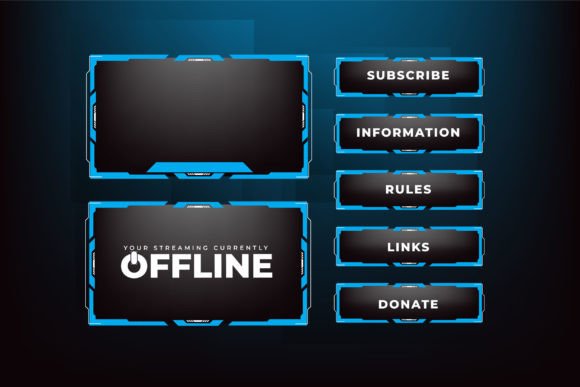
A gaming overlay frame is more than a decorative border. It is the structural element that defines the visual hierarchy of a live stream. It holds the game feed, webcam window, alert box, and chat panel together in a single cohesive layout. For streamers, producers, and content creators, choosing a well-designed overlay template saves hours of manual composition work and delivers a polished, professional appearance from the very first broadcast. Understanding how to work with a gaming overlay frame template design means moving beyond simple download-and-apply thinking and into a repeatable process that supports consistent branding, quick setup, and long-term adaptability.
Where Overlay Frames Fit in the Streaming Production Process
Most people treat stream graphics as a final cosmetic touch. In practice, overlay frames should be planned during the pre-production stage, right alongside microphone settings and scene layouts. Before any stream begins, you decide what information the viewer needs to see and how that information will be framed. The overlay frame becomes the container that separates gameplay from UI elements, creating breathing room and directing attention where it matters most.
During a live session, the frame does its job quietly. It holds webcam windows in place, keeps alerts from overlapping critical game HUD elements, and gives the entire screen a finished look without distracting from the content. After the stream, overlay assets become reusable building blocks. A single live gaming overlay vector can be recolored, resized, or reconfigured for multiple games, special events, or partner streams, saving significant time compared to building new graphics from scratch each time.
This workflow mindset — plan, position, perform, repurpose — prevents last-minute scrambling and makes the visual side of streaming a reliable system rather than an unpredictable art project.
Key Design Elements: Abstract Shapes and Futuristic Blue Tones
Not all overlay designs work equally well across different games or lighting conditions. Templates that lean heavily on specific characters or themes can feel dated quickly or clash with game aesthetics. That is why abstract shapes and clean geometry have become a standard choice for versatile broadcast screen panel designs. They read well at small sizes, scale without losing clarity, and do not compete with game visuals.
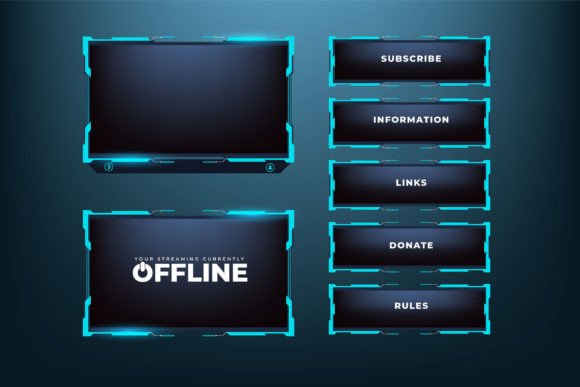
The futuristic shiny blue color palette often seen in modern overlays serves a functional purpose beyond looking sleek. Blue tones naturally recede into the background on most screens, keeping the focus on the bright, high-contrast game imagery. They also pair well with common webcam lighting setups and with the default color schemes of donation alerts and chat widgets. A metallic or glossy finish on the frame’s edges adds depth without requiring complex lighting effects inside streaming software.
When evaluating a template, pay attention to how the abstract elements frame negative space. A good design leaves clean zones for game action, webcam overlap, and text. Crowded templates force you to shrink the game too much or push vital game UI off-screen, which hurts viewer experience.
Vector Format and Customization: Why the File Type Matters
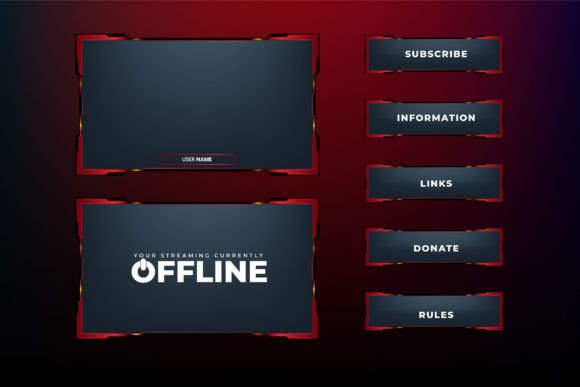
The most practical overlay products ship in vector formats. A gaming overlay frame template design delivered as an AI, EPS, or SVG file can be opened in Illustrator, Affinity Designer, CorelDRAW, or even free tools like Inkscape. This means you are not limited to the original look. You can adjust hue, saturation, and brightness directly, swap the blue metallic finish for a red one, thin out frame borders, or add your own logo without any loss of quality. Raster JPG previews help you see what you are getting at a glance, but the vector file is where the real work happens.
A typical purchase arrives as a compressed ZIP archive. The extraction process is straightforward but should be done before you open your editing software. Use built-in OS tools or utilities like WinRAR or 7-Zip. Once extracted, you will find at least one master vector file and possibly high-resolution JPG or PNG snapshots. Organizing these files properly at the start prevents confusion later when you are quickly rebuilding a scene ten minutes before going live.
If you plan to use multiple overlays for different scenes — starting soon, intermission, main gameplay, and so on — create a folder named Themes or Overlays and subfolders for each scene. Store the original vector files there alongside any exported PNG versions you have rendered for OBS. This keeps your stream assets portable and easy to back up.
Practical Integration with Broadcasting Software
Bringing an overlay template into your streaming software follows a consistent pattern regardless of whether you use OBS Studio, Streamlabs Desktop, or any other compositing tool. The general steps look like this:
- Export the edited overlay frame from your vector application as a .PNG with transparency enabled. A canvas size of 1920x1080 pixels works for most setups.
- In your streaming software, add a new Image source in the appropriate scene. Name it clearly, such as “Gameplay Frame” or “Webcam Border,” to avoid source confusion later.
- Position the overlay image in the source list above your game capture and webcam sources so it renders on top.
- Resize or reposition game capture and webcam windows to fit precisely within the empty zones of the frame. Use alignment guides to center everything cleanly.
- Lock the overlay source once positioned. This prevents accidental drags mid-stream.
Many streamers skip the locking step and end up nudging their frame out of alignment during setup. A locked source eliminates that risk entirely. If you need to tweak the frame later, unlock it briefly, make adjustments, and lock again.
Combining Frames with Alerts, Webcams, and Dynamic Elements
An overlay frame does not exist in isolation. It must harmonize with animated alerts, subscriber goal bars, chat box overlays, and webcam masks. When sourcing or editing your template, think about how these interactive elements will sit inside or alongside the frame. For example, a futuristic blue shiny panel might have a cutout region perfectly sized for a camera box. Add a subtle drop shadow to the camera source inside that cutout to match the depth of the frame itself. This tiny detail unifies the composition.
Alert animations triggered by donations or follows should appear within a dedicated zone, not floating arbitrarily. Many overlay templates include designated alert panels. If yours does not, create one by cropping a section of the frame or building a small matching plate from the vector elements. Consistency across these micro-interactions reinforces your channel’s identity and reduces visual noise.
For streamers who use multiple scenes, design variations of the same frame help maintain flow. A slightly simplified version of the frame can mark “Intermission” while a more detailed layout wraps the main gameplay. You get variety without abandoning your core aesthetic.
Managing Assets for Long-Term Use and Team Collaboration
If you stream with a production team or work with a mod who handles scene switches, a clean asset organization system becomes critical. Store the original vector master files in a shared cloud folder with clear naming conventions, such as MainFrame_blue_v2_1920x1080.ai. Next to that, keep a folder of exported PNGs labeled by scene. Add a simple text document that lists the font names used in any text overlays, size settings, and color codes (hex values). This documentation saves hours when someone else needs to make a quick adjustment.
Version control also matters. Over time, you will refine colors, resize elements, or morph the frame to suit new branding. Keep old versions in an archive folder rather than overwriting them. You may want to revisit a previous design for a nostalgic stream or a special event, and having the original intact prevents regret.
For those who get their templates from small studios or independent designers, preserving the original ZIP file as a backup is wise. Many marketplaces allow indefinite re-downloads, but having a local copy means you are never dependent on a platform’s availability. If you sourced your gaming overlay frame template design from a store like Ifti Stock Graphic Store, check the artist’s note about file usage and support. Small creators often provide direct help if you encounter editing issues, which can be a major advantage over large generic marketplaces.
Adapting Templates Across Different Platforms and Games
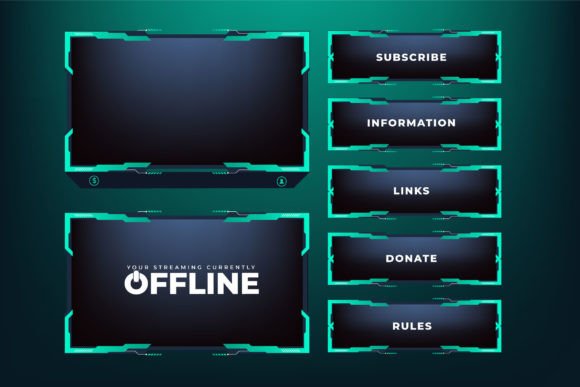
An overlay built for a single game can often be repurposed for many others with small modifications. The key is to keep the core framing geometry while adjusting background strips or accent shapes to match a new game’s color palette. Because the vector source file allows ungrouping and recoloring of individual elements, you can swap that shiny blue panel to a warmer orange tone for a fantasy title in a few clicks.
This adaptability extends beyond gaming. Podcasters who also stream can use the same frame design for their “just chatting” scenes. Educators running live coding sessions or creative workshops can place a clean, minimal version of the frame around their screen share without it looking out of place. The template becomes a visual baseline, and the specific use case determines how you dress it.
When adapting, export a test PNG and load it into your streaming software before the actual broadcast. Check how the frame’s transparency edges interact with bright game scenes. Sometimes a thin stroke or a slight glow effect added in your vector editor prevents the frame from blending into similarly colored backgrounds.
Quality Control and Consistency Checks
Before going live with a newly applied overlay, run a quick pre-stream checklist. This keeps the viewer experience crisp and prevents overlooked alignment errors.
- Confirm that all overlay elements render correctly at the set resolution. A frame designed at 1920x1080 may appear clipped if your streaming canvas is set to a different base resolution.
- Check source ordering. The frame must sit above game and camera sources but below alert overlays unless the frame design dictates otherwise.
- Test webcam framing. Ensure your camera placement looks natural within the designated region and that no part of your face is obscured by frame details.
- Watch a short local recording. Pay attention to how the frame’s opacity, color, and edges interact with moving game content. Adjust if visual clutter appears.
This small verification step often reveals subtle issues that are easy to fix before viewers see them. Over time, the process becomes second nature and takes less than a minute.
Building a Design System from a Single Template Purchase
A well-chosen gaming overlay frame template design can become the seed of a full streaming design system. From one vector file, you can derive webcam frames, alert boxes, banner overlays, stream starting soon screens, offline banners, and even social media headers. Cut out a wedge of the abstract shape and use it as a repeating motif. Recolor one panel and apply it to your YouTube channel art. The vector source gives you the raw materials; your workflow determines how far they carry.
This approach is far more sustainable than buying a new package for every occasion. It also trains your eye and your technical skills. Every edit deepens your understanding of layer management, export settings, and scene composition. If you encounter a problem, most independent stores invite questions. The note in the original ZIP file that says “If you have any problem editing the files, don’t hesitate to contact me” reflects a reality where creators support their work directly — use that resource instead of struggling in silence.
Prioritize templates that come with both vector and preview formats, include clearly separated layers, and offer a timeless aesthetic. The futuristic shiny blue abstract design fits this description well. It works across genres, ages gracefully, and gives you full control over every visual decision. With a small upfront investment in organization and a few practice edits, your stream graphics stop being a source of stress and become an asset that evolves with your content.