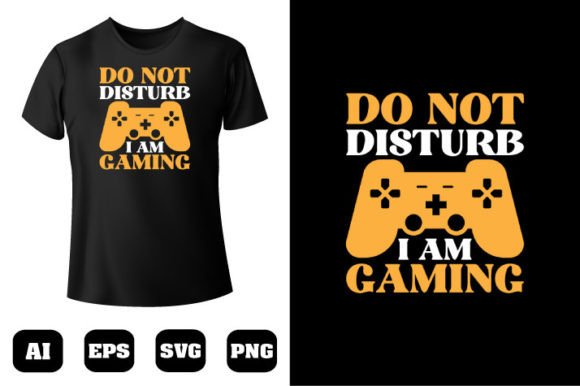
Don’t Disturb I’m Gaming SVG Design: The Ultimate Digital Download for Personalized Crafting
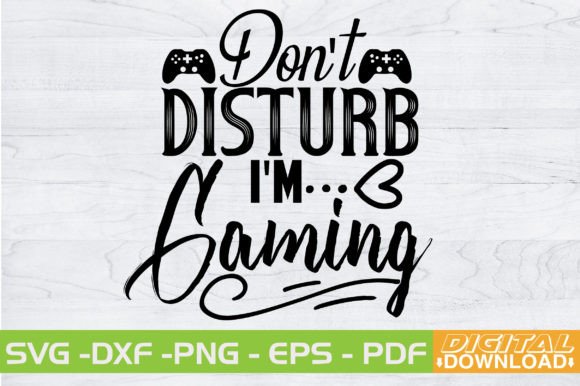
Gaming culture has moved far beyond the screen. It shows up on clothing, laptop decals, wall art, mugs, and stream backdrops—anywhere a person wants to broadcast their passion. The Don’t Disturb I’m Gaming SVG Design captures that playful, focused energy in a ready-to-cut vector file that makers can turn into something tangible. Whether you run a small vinyl shop, create gifts for friends, or just want a custom door sign for your gaming den, this design is a practical shortcut. It reflects a shift in how people use DIY tools to make their interests visible, and it arrives as a pure digital download only—no physical product shipped, no waiting, no inventory.
Why a “Don’t Disturb I’m Gaming” Message Clicks
The phrase itself is a confident, slightly cheeky signal. It’s recognizable shorthand for “I’m in the zone,” and it resonates with anyone who sets aside time for focused play. Remote workers who steal a lunchtime session, college students sharing dorm space, or content creators guarding streaming hours all understand the value of a gentle but firm boundary. The design works because it articulates a modern need: carving out personal time in a world that demands constant availability. Instead of a generic “Do Not Disturb” sign, this SVG design speaks directly to gaming identity. It turns a practical request into a badge of belonging.
What You Actually Get: Layers, File Types, and True Versatility
This isn’t a single flat image thrown into a zip folder. The download is built for crafters who need flexibility. Once you purchase, you receive one .zip file containing five carefully organized assets. Here’s exactly what’s inside:
- 1 SVG File (Word By Layer) – Each word of the phrase sits on its own layer. That means “Don’t,” “Disturb,” “I’m,” and “Gaming” can be separated, resized, or colored independently. Cricut users love this because it simplifies multi-color vinyl projects and makes weeding less tedious.
- 1 EPS File – A fully vector and editable source that works straight out of the box with Adobe Illustrator, CorelDRAW, and other professional design tools. Ideal if you want to modify typography or integrate the art into larger branding projects.
- 1 PNG File – Raster format at 300 DPI with a background transparent. Perfect for mockups, print-and-cut projects, sublimation previews, or simply printing on cardstock without any white box around the text.
- 1 DXF File – AutoCAD-compatible vector file that opens neatly in Silhouette Studio’s Business Edition and many CNC-related slicing apps.
- 1 PDF File – The Adobe Illustrator source file exported in a universally readable format. Use it to check the design structure or share with a print shop while keeping layers intact.
Every format is compatible with Cricut, Silhouette, Inkscape, Adobe Photoshop, and Adobe Illustrator. You don’t need to be a software expert; the files are designed to reduce friction whether you’re a beginner loading a cut file into Cricut Design Space or a professional finetuning vectors for a client project.
Modern Crafting Workflows and the Rise of Layered Vector Designs
The home crafting landscape has matured. Hobbyists aren’t just cutting single-color monograms anymore. They want dimension, shadow effects, and cleanly separated color blocks that pop off a t-shirt or tumbler. A word by layer SVG file directly supports that ambition. Instead of manually ungrouping and isolating letters, you get a logically split file. The “Don’t Disturb” text might be one colour, “I’m” a contrasting accent, and “Gaming” a bold statement in yet another vinyl. This layered structure also makes it easier to resize without losing proportion, or to omit parts of the design without breaking the whole composition.
Compatibility across multiple software ecosystems is no longer optional; it’s expected. Crafters switch between Inkscape for initial edits, Cricut Design Space for cutting, and Photoshop for mockups. The file bundle caters to that reality. The EPS and PDF preserve editability, the SVG talks to most consumer cutters, and the transparent PNG helps you visualize the final product before ever reaching the heat press. This kind of thoughtful packaging saves hours of reformatting and guesswork, which directly impacts how quickly a project moves from idea to finished good.
Who Benefits Most from This Design?
The audience is broader than you might first assume. Of course, gamers—especially those who stream or create content—use this design for custom neon-style signs, friction-fitted door plates, or even etched glassware. But the reach extends further:
- Small Business Owners and Etsy Sellers use gaming SVG files to expand product lines without hiring designers. A single design can become a sticker, a decal, a coffee mug print, and an iron-on hoodie. The word-by-layer format makes it easy to offer color variations without redoing the whole file.
- Parents and Partners of gamers appreciate an easy way to personalize gifts. A laptop decal with this phrase, applied using permanent vinyl, turns a generic device into a thoughtful present.
- Educators and Makerspace Facilitators looking for relatable design challenges for students can incorporate this SVG into workshops. The layered structure teaches the logic of vector masks and material separation in a fun context.
- Freelance Designers who craft branded assets for esports clubs or gaming lounges can pull the EPS file into their workflow and tweak typography to match client guidelines, saving hours of layout work.
The thread that connects all these users is a need for speed without sacrificing creative control. They want a starting point that’s already crafted with end-use in mind, not a raw auto-traced mess. This bundle delivers exactly that.
Making the Most of Your Digital Files: Practical Tips
Even a well-prepared design requires a few smart choices to shine. After downloading the zip, first unzip the folder and store the files in an organised directory so you always have a clean master copy. If you’re using Cricut Design Space, upload the SVG file. Because it’s word-by-layer, you can immediately assign different colors to each word in the layers panel. Do a test cut on scrap cardstock to verify sizing before committing to expensive vinyl. For Silhouette Studio, the DXF or SVG will both work, though some users prefer the DXF for its clean line handling. Inkscape users will appreciate the SVG’s preserved layer names—just open, ungroup if needed, and export as PNG for sublimation.
When cutting heat transfer vinyl, remember to mirror the design and place the shiny side down. The transparent PNG is invaluable here: import it into a mockup template to check alignment and size on the garment before cutting. The EPS file can be opened in Adobe Illustrator to adjust stroke thickness or convert the design into a single-color stencil for etching. Because the download includes the PDF, you can even print the design directly onto waterslide decal paper for irregular surfaces without needing a cutting machine at all. These small decisions compound across projects, turning a simple file into a multipurpose resource.
Why Digital Downloads Dominate the Modern Craft Economy
The “no physical product” model has reshaped how creators access designs. Instant delivery meets the expectation of immediacy; a maker decides to craft on a Sunday afternoon, buys the file, and starts cutting within minutes. There’s no shipping cost, no customs delay, and no environmental footprint from packaging. This aligns with a broader trend where digital assets are treated as building blocks of personal expression rather than one-off packaged goods.
Gaming-themed SVG designs in particular have surged because they tap into an identity-driven market. A person who loves gaming doesn’t just want a generic “Welcome” mat. They want a visual language that signals their community. From a business angle, crafters who curate these digital designs can build entire collections around gaming, streaming, and retro arcade themes, generating recurring income without inventory risk. The buyer, meanwhile, gains a permanent file they can reuse across multiple personal projects—a single download that might decorate a water bottle, a phone case, and a bedroom wall over time.
Licensing, Sharing, and Ethical Crafting Considerations
With any digital download, understanding usage rights matters. Most individual SVG purchases are intended for personal projects and small-scale commercial physical production—meaning you can sell completed shirts, decals, or mugs that incorporate the design, but you cannot resell, share, or redistribute the digital file itself. This keeps the design original for everyone who purchases it and supports the independent designers who put work into layered architecture and clean vector points. Even if the listing says “no physical product, digital download only,” many crafters will build a modest income producing tangible items with the design, and that’s generally welcomed as long as you respect the no-redistribution boundary.
A Design That Grows With Your Skills
One overlooked advantage of a layered SVG is its longevity. A beginner might start by cutting the full phrase in a single color of permanent vinyl and sticking it to a notebook. As their skills evolve, they can return to the file and experiment with holographic vinyl on “Gaming” while keeping “Don’t Disturb” matte, or use offset path tools to create a knockout background shape. The EPS and PDF enable even deeper customization—changing fonts, adding outlines, or merging the design into a larger crest. Because the download doesn’t lock you into a single software, you’re not forced to upgrade a specific platform just to edit later. The files silently wait on your hard drive, ready whenever inspiration strikes again.
The Don’t Disturb I’m Gaming SVG Design isn’t just a trendy splash of text. It’s a carefully structured, multi-format toolkit that mirrors how modern crafters actually work—across devices, across materials, and across different skill levels. From the word-by-layer SVG that slashes prep time to the high-res transparent PNG that aids visualization, every piece in the zip file has a clear purpose. And because it arrives purely as a digital download, you control when and how the creation happens. In a creative landscape that prizes flexibility and personal identity, a design like this does more than decorate; it lets people communicate a slice of who they are, one vinyl cut at a time.