Building a Cohesive Brand Identity With the Blue Samurai E-sports Gaming Mascot Logo
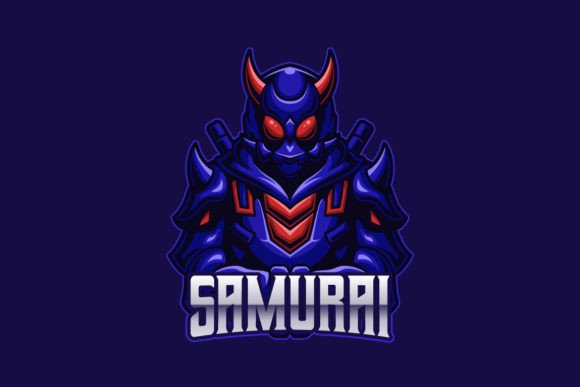
Brand recognition in competitive gaming and content creation hinges on visual consistency. When a viewer scrolls through YouTube thumbnails, Twitch streams, or tournament brackets, they process imagery in milliseconds. A well-executed mascot logo cuts through that noise. The Blue Samurai E-sports Gaming Mascot Logo delivers a character-driven identity mark designed specifically for teams, channels, and gaming brands that need an immediate visual anchor. What sets this particular asset apart is not just the illustration itself, but the way the file package is structured for real production environments where multiple people, platforms, and output formats intersect.
Understanding where a logo like this fits into your broader creative and operational workflow matters more than simply having a cool graphic. The difference between a logo that sits unused in a downloads folder and one that becomes the recognizable face of your brand often comes down to how smoothly it integrates with the tools, timelines, and team processes you already have in place.
What the Blue Samurai E-sports Gaming Mascot Logo Actually Includes
Before diving into implementation, it helps to know exactly what you are working with. The downloadable package contains multiple file formats that serve distinct purposes across a production pipeline. You receive an AI vector file, an EPS vector file, a layered PSD, a transparent PNG of the character only, a Readme document, and a link to the font used in the design. All files operate in RGB color space, which is the standard for digital display. The logo is fully editable and resizable, meaning text elements can be modified and the character artwork can scale without quality loss.
This multi-format approach is not just a convenience—it is a practical necessity for anyone who regularly moves assets between design software, video editing suites, streaming overlays, and print vendors. Each format has a specific role in a production workflow, and knowing which one to reach for at each stage saves hours of troubleshooting and re-exporting later.
Where a Mascot Logo Fits Into a Brand Development Timeline
Brand development for an esports organization, YouTube channel, or gaming community typically follows a sequence: concept, visual identity creation, asset rollout, and ongoing content production. A pre-made mascot logo like the Blue Samurai can enter that timeline at different points depending on your starting position. If you are launching a new team and need to move quickly from idea to published content, this logo can serve as the foundational visual element around which you build banners, overlays, and merchandise designs. If you already have a logo but need a secondary character mark for specific content series or seasonal branding, the mascot can function as an extension of an existing identity system without requiring a full rebrand.
The key is treating the logo not as a standalone decoration but as a component that interacts with your other brand assets—color palettes, typography choices, background templates, and motion graphics. When you bring the Blue Samurai into a project, consider what surrounds it. Does your channel art provide enough breathing room for the character? Do your overlay elements clash with the blue tones? These are integration questions that determine whether the final result looks professional or pieced together.
Pre-Production Planning With Editable Vector Assets
Before you place the logo on any deliverable, spend time in the preparation phase. Open the AI or EPS file in Adobe Illustrator or an alternative vector editor like Affinity Designer or Inkscape. Examine the layer structure. Identify which elements are grouped, which are on separate layers, and how the text objects are configured. Because the package specifies that text can be edited and fonts changed easily, you can replace placeholder team names or channel handles with your own while preserving the visual hierarchy the designer established.
This pre-production step is where you adapt the asset to your specific context. Maybe your team name is longer than the placeholder text and you need to adjust spacing or scale. Maybe your brand colors lean toward a cooler blue and you want to shift the character's tones to match. Because the file is fully editable, these modifications happen without degrading the artwork. Make these adjustments once in the master file, and every subsequent export inherits the changes. That single-source-of-truth approach prevents the fragmentation that happens when multiple team members create their own versions of a logo with inconsistent modifications.
Integrating the Logo Into Content Creation Pipelines
Content creators working across YouTube, Twitch, TikTok, and Twitter face a specific challenge: each platform has different aspect ratios, resolution requirements, and safe zones. The transparent PNG included in the package becomes the workhorse format for this multi-platform reality. Because it isolates the character from any background, you can place it onto thumbnails, end screens, stream overlays, and social media graphics without wrestling with background removal tools.
For video editors working in Premiere Pro, DaVinci Resolve, or Final Cut Pro, the PSD file offers additional flexibility. You can import the layered document directly into your timeline, animate individual elements if desired, and adjust blending modes to integrate the mascot with footage or motion backgrounds. If your workflow includes After Effects for animated intros or transitions, the AI or EPS vector paths can be imported and converted to shape layers for smooth scaling during camera moves or kinetic typography sequences.
A practical workflow example: a streamer preparing for a tournament weekend might start by opening the AI file to export a high-resolution version of the logo with their team name, then drop the transparent PNG into their OBS scene collection as a persistent watermark, then use the PSD in Photoshop to create countdown screen graphics for intermission segments. Each format serves a distinct purpose without redundant effort.
Print Applications and the RGB Consideration
The package operates in RGB color space, which some users might view as a limitation for print work. In practice, most small-scale print applications—jersey mockups, banner printing, sticker runs—can be managed by working with a print vendor that accepts RGB files and performs in-house conversion, or by converting to CMYK yourself with an understanding that some color shift may occur. For teams that plan to produce merchandise regularly, the editable vector files give you the flexibility to adjust color values for specific print processes.
When sending the logo to a print shop, communicate clearly about the file format they prefer. Many accept EPS files natively, and the vector nature of the artwork means it will reproduce cleanly at any size, from embroidered patches on jerseys to large-format venue banners. The Readme file included in the package typically contains guidelines or notes that can help you or your printer understand any specific settings or considerations for output.
Font Management and Typography Consistency
Typography consistency across brand materials often gets overlooked in fast-moving esports and content environments. The package addresses this by including a download link for the specific font used in the logo design. Downloading and installing that font before making text edits ensures that any modifications you make match the original aesthetic. It also gives you the option to use the same typeface in supporting materials—overlay text, social media graphics, video titles—creating a unified typographic system that reinforces brand recognition.
If you choose to substitute a different font, the editable text layers make that change straightforward. The key is to make a deliberate typographic choice and then document it. When multiple contributors create graphics for the same brand, a shared understanding of which fonts are approved prevents the gradual drift that makes a brand look inconsistent over time.
Organizing Assets for Team Access and Long-Term Use
As your team grows or your content output increases, asset organization becomes a practical bottleneck if not addressed early. Create a shared drive folder structure that separates master files from exported deliverables. Keep the original AI and EPS files in a "Master Assets" folder that only designated designers can modify. Place exported PNGs at various resolutions into platform-specific folders—one for YouTube thumbnails, one for Twitch panels, one for Twitter headers. Name files descriptively with dimensions included so that team members can grab what they need without opening design software or asking for clarification.
This organizational discipline extends the lifespan of the Blue Samurai logo as a brand asset. When a new team member joins or you launch on an additional platform six months from now, the files are locatable and ready. The vector formats ensure that the artwork remains usable regardless of how display technology or platform requirements evolve. A logo built in vectors today can be exported at 8K resolution or adapted for whatever canvas sizes emerge in the future.
Quality Control Across Multiple Outputs
Maintaining visual quality as the logo moves through different software and platforms requires a few deliberate checks. When exporting from the vector master, always confirm that anti-aliasing settings are appropriate for the intended use. Screen graphics typically benefit from anti-aliasing enabled, while some print processes may require it disabled for crisp edges on cut lines. When resizing the transparent PNG, use an image editor that applies proper resampling algorithms rather than relying on browser-based or OS-level resizing, which can introduce artifacts.
For video applications, test how the logo reads at the resolutions and bitrates your viewers will actually experience. A logo that looks sharp on a 4K editing monitor may become muddy when compressed for a 1080p stream at moderate bitrate. The vector source files let you export test versions at exactly your target resolution so you can preview real-world appearance before committing to a final asset across dozens of videos or stream scenes.
Adapting the Mascot for Different Contexts Without Losing Identity
The Blue Samurai character illustration carries a specific tone—fierce, competitive, stylized. That tone will serve certain content types exceptionally well: tournament announcements, highlight reels, competitive gameplay series. For other content, such as community updates, behind-the-scenes vlogs, or educational content, you might want to use the logo more sparingly or pair it with different visual elements that soften the overall presentation. The transparent PNG format supports this selective use because you can place the character precisely where it adds value without dominating every frame.
This contextual awareness separates brands that apply their logo mechanically to everything from those that use their visual assets with strategic intent. The Blue Samurai mascot is a tool in your branding toolkit, not an obligation to plaster across every piece of content. Knowing when to feature it prominently and when to let it recede builds a more sophisticated brand presence over time.
Practical Implementation Tips From Production Experience
Teams that integrate mascot logos smoothly tend to follow a few consistent practices. First, they designate one person or a small group as the keepers of the master files. This prevents the proliferation of slightly different versions that inevitably happens when multiple people make independent edits. Second, they build template files for recurring deliverables—stream starting soon screens, video end cards, Twitter post backgrounds—that already have the logo placed correctly, so that day-to-day content creation does not require reopening and re-exporting the logo each time. Third, they periodically audit their active assets to ensure that any updates to the logo are reflected across all platforms, removing outdated versions from circulation.
The editable nature of the Blue Samurai logo supports all of these practices. Because text can be modified and the artwork can be recolored or adjusted, you can create seasonal variations, event-specific lockups, or alternate colorways while maintaining the core character design that your audience recognizes. This flexibility, when managed with discipline, keeps your brand fresh without sacrificing the recognition equity you have built.
For solo creators and small teams who wear multiple hats, the efficiency gains of a well-structured logo package compound quickly. Every minute saved not manually removing backgrounds, not hunting for the right font, not recreating a graphic at a different size is a minute that goes toward content quality, community engagement, or strategic planning. The Blue Samurai E-sports Gaming Mascot Logo, treated as a production asset rather than just a design file, becomes part of a workflow that scales with your ambitions.